Stop Configuring, Start Conversing: Meet Builder Copilot
Tuning an AI agent used to mean hunting through settings: tone here, answer length there, knowledge gaps somewhere else. Builder Copilot turns all of it into one conversation — you describe the outcome, it drafts the exact change, and nothing goes live until you approve. Here is how it works, what it refuses to do, and why propose-first is the only AI autonomy model we trust.
In this article
The Configuration Tax Nobody Talks About
Every no-code AI agent platform makes the same promise: build a chatbot in minutes. And mostly, that part is true — you paste a URL, the knowledge base fills itself, a widget appears on your site.
Then reality arrives. The answers are a little too formal. Or too long. A customer asks about your refund window and gets a paragraph when a sentence would do. You know exactly what you want — "be friendlier, keep it short" — but turning that sentence into settings means finding the tone dropdown, the response-style option, and the custom-instructions field, then testing whether the combination actually did what you meant.
We call this the configuration tax: the gap between describing an outcome and operating an interface. It is why so many agents launch with default settings and stay there forever. Builder Copilot exists to delete that tax.
What Builder Copilot Actually Does
Copilot is a configuration assistant that lives inside your agent's studio. You open it, type what you want in your own words — any of the ten languages Chatloom speaks — and it goes to work:
It inspects before it suggests. Copilot reads your agent's live settings, its knowledge sources, and where it is deployed. Ask "what is missing before I launch?" and it answers from evidence, not generic checklists.
It tests like a customer. Copilot can run real preview questions against your agent — "what happens when someone asks about pricing?" — and base its recommendation on what your agent actually said.
It drafts typed changes. When you ask for a change, Copilot produces a structured proposal: which setting, the current value, the new value, and why. Not a vague promise — an exact diff.
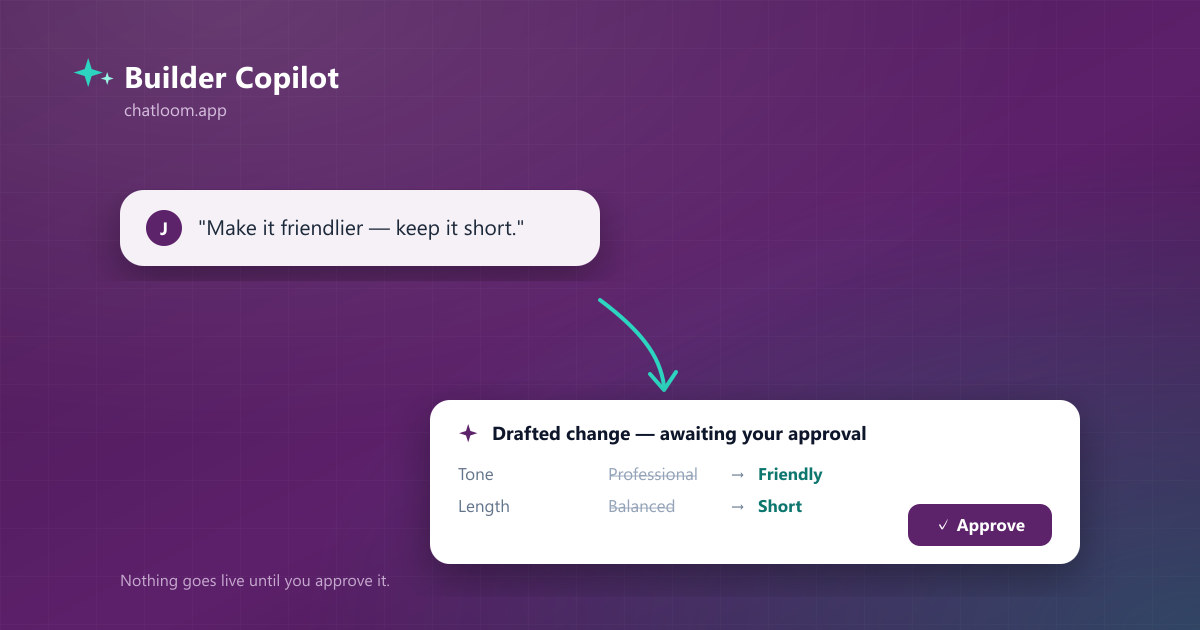
In practice a session looks like this: "Make the answers friendlier but keep them short." Copilot checks your current tone and response style, then proposes tone → friendly, answer length → short, plus a custom instruction telling the agent to skip filler and get to the point. You see all three, before and after, on one card.
Propose-First: The Safety Model
Here is the part we consider non-negotiable: Copilot cannot change anything by itself. Every action it takes produces a draft — never a mutation.
- You see an exact before/after diff for every proposed change, with the reasoning next to it.
- You select what to apply. A proposal with three changes can be applied as one, two, or all three.
- Higher-impact changes require an extra confirmation. Anything that affects how customers are handed to humans, for example, carries its own explicit checkbox.
- Everything is reversible. Applied changes can be undone with one click for a full day — and if the agent was edited in the meantime, Copilot detects the conflict and refuses to blindly overwrite it.
We built it this way because "AI that configures your AI" is only useful if you can trust it on a Tuesday afternoon with real customers on your site. Trust does not come from accuracy claims; it comes from the structural inability to act without you.
What It Refuses to Do
A capable assistant is defined as much by its boundaries as by its features. Copilot has no tool — and can invent no tool — for the actions that should always stay human:
- It cannot delete anything: agents, knowledge, contacts, conversations.
- It cannot send anything: no messages, no campaigns, no broadcasts.
- It cannot touch billing, users, security settings, or channel connections.
- It cannot grant itself permissions or act on another account's data.
Ask it for any of these and it will tell you plainly that the action belongs in the dashboard, and point you to the right section. Fair-use limits are built in too — Copilot usage is capped per plan and resets daily, so an experiment can never turn into a surprise bill.
Why This Beats a Settings Page (and a Prompt Box)
There are two common alternatives, and both fall short in the same way.
The settings page is precise but illiterate: it cannot read your intent. It offers thirty controls and leaves the mapping from "sound more like us" to the right combination entirely to you.
The raw prompt box — pasting instructions into a system prompt — is expressive but unaccountable. You cannot see what changed, you cannot partially apply it, and you certainly cannot undo it a day later.
Copilot sits deliberately between the two: natural language in, typed and reviewable changes out. You get the expressiveness of a conversation with the auditability of a settings page. Every change lands in the same fields you could have edited by hand — there is no hidden second brain, no shadow configuration. Close Copilot and your agent's studio shows exactly what it did.
Getting Started in Two Minutes
Builder Copilot is live for every Chatloom account today, in all ten interface languages.
- Open any agent — the studio loads with Ask Copilot in the header.
- Start with a diagnostic: "What is missing before this agent is ready to launch?"
- Ask for one improvement: "Test how it answers a pricing question, then make the answer more concise."
- Review the card, apply what you like, and check the change live with Test Live.
If you have not built an agent yet, the whole loop — create an agent, teach it your content, and let Copilot polish it — fits comfortably inside a coffee break. And if Copilot ever suggests something you disagree with, that is fine: it drafted, you declined, and your agent never noticed.
Frequently Asked Questions
Can Builder Copilot change my agent without my approval?
No — structurally, not just by policy. Copilot's tools can only create drafts. Every change is shown as a before/after diff that you explicitly apply, higher-impact changes need an extra confirmation, and applied changes can be undone for a full day.
Which languages does it work in?
All ten Chatloom languages: English, Turkish, German, Spanish, French, Italian, Japanese, Korean, Portuguese, and Chinese. Copilot replies in the language of your dashboard, and the changes it drafts respect the language your agent serves customers in.
Does Copilot cost extra?
It is included in every plan with fair-use limits that reset daily, so costs stay predictable. Free accounts get a taste, paid plans get room to work with, and the limits are generous enough that normal use never touches them.
How is this different from asking ChatGPT how to configure my bot?
A general assistant can only give advice about settings it cannot see. Copilot inspects your actual agent — its real configuration, knowledge and deployments — runs real test questions against it, and produces changes that apply directly, with an audit trail and an undo. Advice versus action, guesses versus evidence.
Ready to Add an AI Chatbot to Your Website?
Build and deploy a RAG-powered AI chatbot in under 5 minutes. No code required. Start with the free plan.