How to Auto-Reply to Telegram Messages With AI From Your Own Account (2026)
Most businesses on Telegram never talk to customers through a bot. Customers write to the owner's own account, at all hours, asking the same twenty questions. Since May 2026 Telegram lets any user hand those chats to a bot. Here is how to make that bot an AI that answers from your own content, steps back the moment you reply, and never pretends to be you.
이 글의 내용
Why Your Personal Telegram Is Your Real Inbox
For a lot of sellers, course creators, coaches, repair shops, agencies and service businesses, the support channel is not a website and not a bot. It is the owner's Telegram. A customer sees a post, taps the username and writes: how much is it, is it in stock, when can you deliver, do you have a slot on Friday. The owner answers between other work, late at night, or not at all.
A separate bot does not fix that. Customers already have your username, and they are not going to look for @YourShopBot. What fixes it is an assistant that answers inside the chats customers already open with you. That is exactly what Telegram's Chat Automation allows, and since 2026 it is open to everyone.
What Telegram Chat Automation Is, and What Changed in 2026
Telegram Business introduced chatbots for personal accounts in 2024: you could connect a bot that reads and answers your private chats. It was limited to Premium subscribers. In May 2026 Telegram opened it to every user. You go to Settings > Chat Automation, add a bot and choose which chats it may access. On the bot's side the same feature is called Secretary Mode.
Three rules come from Telegram itself, and they are good ones:
- You choose the chats. Common setups are "all chats except my contacts" or "only new chats".
- You choose the rights. The bot can read the chats you picked; it can reply only if you allow it.
- It answers, it does not start. A bot may write in a chat only within 24 hours of the customer's last message. It replies to questions; it never cold-messages anyone.
Away Messages vs an AI Auto-Reply
Telegram's business tools also include greeting and away messages. They are useful, and they are fixed text: the same sentence for every customer, whatever they asked. "Thanks for your message, I'll reply soon" tells a customer nothing about the price they wanted.
An AI auto-reply reads the question and answers it from your own content: prices, stock, delivery times, opening hours, booking rules, course details, in the language the customer wrote in. Use a fixed away message when all you need to say is "back tomorrow". Use AI when the questions repeat and the answers already exist somewhere in your website, price list or FAQ.
What You Need
- A Telegram account. No Premium subscription needed.
- A bot connected to an AI platform. In Chatloom you can create one in a tap from Channels, Telegram, Create my bot in Telegram, or connect a bot you already have.
- Your content. A website, a price list, an FAQ, PDFs. The AI answers from this, and it is the difference between a useful reply and an invented one. If your answers live in your head, write the twenty most common ones down first; it is the best hour you will spend on this.
Step-by-Step Setup
- Create or connect the bot. In Chatloom open Channels, choose Telegram and press Create my bot in Telegram. Press Start in the chat that opens, then Create my bot, and confirm in Telegram's creation window. If you already have a bot, paste its token instead.
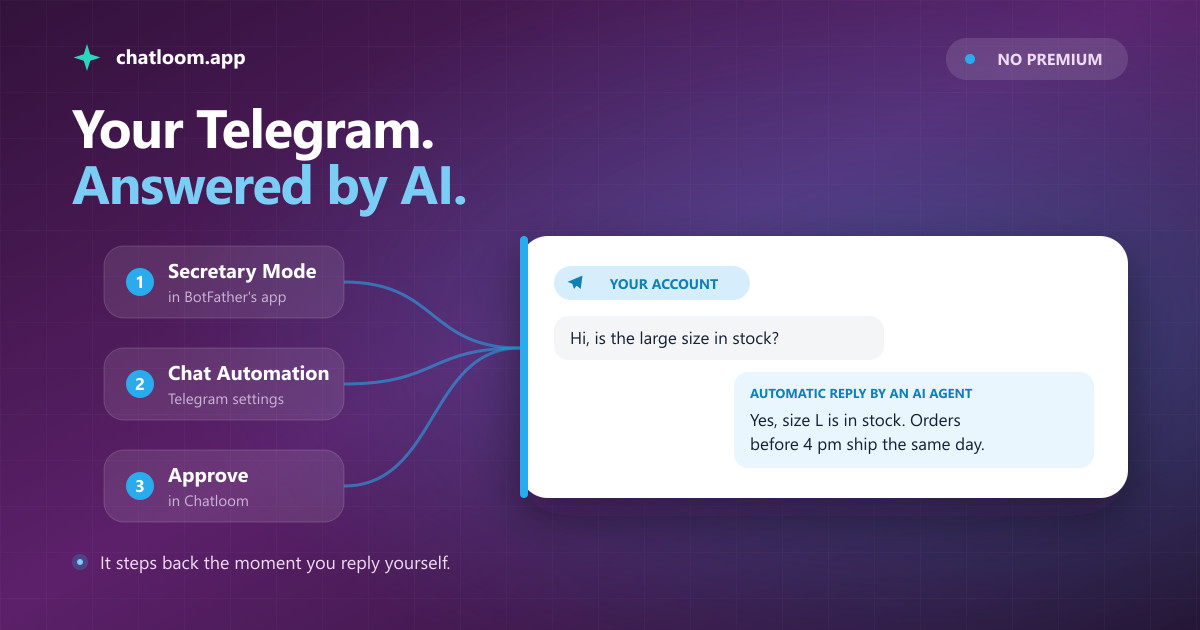
- Turn on Secretary Mode. Open @BotFather, tap Open to launch its app, choose your bot, and under Mode Settings switch on Secretary Mode. Telegram can take a few minutes to report the change; the panel in Chatloom checks it for you.
- Connect it to your account. In the Telegram app open Settings > Chat Automation, add your bot, choose which chats it may answer and allow it to reply.
- Approve it in Chatloom. Your account appears on the Telegram card a few seconds later. Press Approve. Until you do, nothing is answered and nothing is stored, because anyone who knows a bot's username could otherwise connect it to their own account and run their chats through yours.
Now test it the way a customer would: write to your own account from a second account, or ask a friend to. The reply arrives in seconds, from your account.
How It Behaves Once It Is Live
- It steps back when you reply. If you answer a customer yourself from your phone, the AI stays quiet with that customer for a window you choose, from 30 minutes to 24 hours. Nobody gets two answers to one question, and you can take over any conversation simply by typing.
- It says it is an AI. The first AI reply in each chat starts with a short line saying it was written by an AI. A reply from a person's account looks like that person typed it, so telling customers is the honest thing to do, and in the EU the AI Act requires it.
- Everything lands in one inbox. Customer messages, AI replies and the replies you type in Telegram show up in Chatloom's inbox as one thread, with a countdown for Telegram's 24-hour window.
- It hands over. When a customer asks for a person, the AI says so and flags the chat for you instead of improvising.
What It Is Good At, and What It Is Not
It is good at the repetitive questions that eat your evenings: prices, stock, delivery, opening hours, booking rules, course details, payment methods. It answers them in whatever language the customer writes, at 3 a.m. as well as at noon, and it answers from your content, so the answers match what you would have said.
It is not built for negotiating, for complaints that need judgment, or for anything you have not written down. Keep your content current: if your price changes and your price list does not, the bot will quote the old price. And it does not message people first. Telegram's 24-hour rule and our own design keep it to answering.
Privacy: What the AI Sees
The AI sees only the chats you selected in Chat Automation, and only after you approve the account. Each message is sent to the AI provider your agent uses to write the answer, through business APIs that do not train on it. Conversations are kept like every other conversation in your Chatloom account, 30 days after the last message by default, and you can delete them at any time. You can disconnect whenever you like, in Telegram under Chat Automation or in Chatloom with one click. The details are in our privacy policy.
What It Costs
Telegram charges nothing for bots or for Chat Automation. In Chatloom, Telegram is included on every plan, the Free plan too. Plans differ by how many AI replies they include each month, and one customer question plus the AI's answer counts as one. The Free plan includes 100, enough to run it on real chats for a while before deciding; paid plans start when the volume is real.
자주 묻는 질문
Do I need Telegram Premium to auto-reply with a bot?
No. Since May 2026 Chat Automation is available to every Telegram user. You connect the bot under Settings > Chat Automation and choose which chats it may answer.
Will my friends and family get AI replies too?
Only if you include their chats. In Chat Automation you choose the chats the bot may access; excluding your contacts keeps personal conversations personal.
Can customers tell that a reply came from an AI?
Yes. The first AI reply in each chat says it was written by an AI. A reply from a person's account would otherwise look like the person typed it, and in the EU the AI Act requires telling people they are talking to an AI.
What happens when I reply to a customer myself?
The AI steps back for that customer for the window you set, from 30 minutes to 24 hours, then answers again when they write. Your own replies appear in the Chatloom inbox in the same thread.
Can the bot message customers first?
No. Telegram lets a bot write in a chat only within 24 hours of the customer's last message, so it answers questions; it does not send cold messages or broadcasts from your account.
Does this work in Telegram groups?
Chat Automation covers private chats. For groups, add the bot itself to the group: it answers when someone mentions it or replies to it, so a busy group does not use up your monthly replies.
관련 리소스
관련 글
텔레그램 AI 봇 만드는 법: 코딩 없이, 단계별로 (2026)
텔레그램은 약 1분 만에, 그것도 무료로 봇 토큰을 내어 줍니다. 어려운 건 언제나 그다음이었습니다. 봇이 내 비즈니스를 제대로 이해하고 실제 질문에 답하게 만드는 일 말이죠. 2026년에는 그 부분도 몇 분이면 끝납니다. @BotFather에서 시작해 내 콘텐츠로 학습한 실전 AI 봇까지, 코드 한 줄 없이 가는 전 과정을 담았습니다.
튜토리얼내 데이터로 AI 챗봇 학습시키기: 실전 완벽 가이드
범용 AI 챗봇은 우리 비즈니스에 대해 아무것도 모릅니다. 이 가이드에서는 자체 문서, 웹사이트 콘텐츠, 지식 베이스로 챗봇을 학습시켜 정확하고 브랜드에 특화된 답변을 제공하는 방법을 단계별로 안내합니다.
AI 기술WhatsApp·Instagram·Messenger AI 고객 지원, 이제 클릭 한 번으로 연결됩니다
2026년 8월 6일 Meta가 Chatloom의 instagram_manage_messages, whatsapp_business_messaging, whatsapp_business_management 권한을 승인했습니다. 기술 장벽은 사라졌고, 이제 핵심은 기업의 실제 정보에 근거해 빠르게 답하는 것입니다.
웹사이트에 AI 챗봇을 추가할 준비가 되셨나요?
RAG 기반 AI 챗봇을 5분 안에 구축하고 배포하세요. 코딩 불필요. 무료 플랜으로 시작하세요.